Shortcuts and quick layouts
Send a window left, right, to the center or to full size with a keyboard shortcut or a quick layout.
Kilter saves your Mac window layouts and puts every window back with one click, with Undo if you change your mind.
One-time purchase · Free updates · Apple Silicon, macOS 26+
Kilter remembers each window by its app and title, along with its place and size.
Open the apps you use for a task and put each window where you want it.
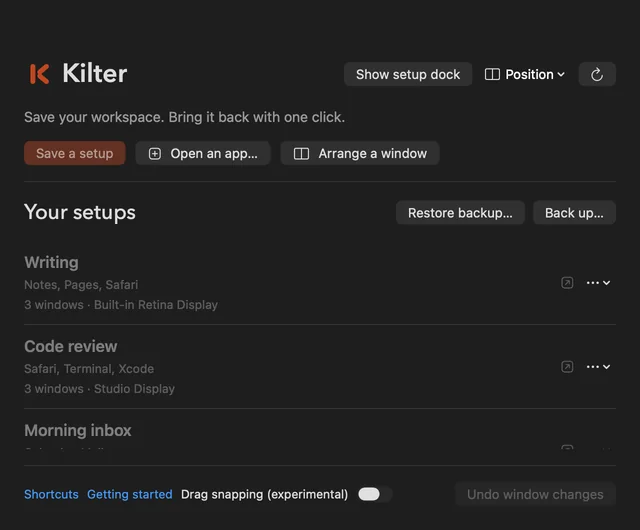
Choose Save a setup, give it a name like Writing, and pick the windows to include.
Click the setup and every window moves back into place. Undo returns them to where they were.
Keep the documents you need open so a setup can find them. Kilter restores window positions and opens apps; it does not reopen specific documents or browser tabs.
Save a setup, open an app or arrange one window from a single small panel. Undo window changes sits at the bottom, one click away.
Send a window left, right, to the center or to full size with a keyboard shortcut or a quick layout.
Save the sizes you use most and apply them to any window.
Keep a project folder and a web link with a setup and open them with its windows.
Open installed apps from Kilter, then put their windows where they belong.
Keep a compact Kilter control in a screen corner and open the full panel when you need it.
Type what you want, like “Make this window bigger and center it.” Common commands work without a model. Others run locally with Apple Intelligence or an existing Atris local runtime.
Kilter includes a local tool pack for compatible agents: a JSON-lines protocol and an MCP adapter.
{"id":"1","op":"inspect"}
{"id":"2","op":"preview","windowId":"…","zone":"leftHalf"}
{"id":"3","op":"apply","token":"…"}
{"id":"4","op":"undo"}
Everything runs on your Mac, with no remote control port. Window titles and positions go to the agent you connect, which may send them to its model provider.
Set up an agentKilter for Mac
$15one-time
Requires an Apple Silicon Mac with macOS 26 or later and Accessibility permission. Payment is handled by Stripe. The seller is Atris Labs, and the charge on your card statement will mention Kilter.
An Apple Silicon Mac with macOS 26 or later. Kilter asks for Accessibility permission so it can move and resize windows.
Yes. If Kilter is not right for you, email support@atris.ai within 14 days for a full refund.
All of them. Every Kilter update is free, and your download link always gets the newest version.
Your setups are stored on your Mac, and language commands run locally. If you connect an agent, it receives window titles and positions and may send them to its model provider.
No. Setups, shortcuts and quick layouts work without one, and so do common commands like “center this window.” Other language commands use Apple Intelligence or an existing Atris local runtime.
No. Kilter restores window positions and opens apps. It does not reopen specific documents or tabs, so keep the documents you need open and your setup can find them.
Your download link appears right after payment, and we email it to you too. Kilter is signed and notarized by Apple, so it opens normally.
One-time purchase · 14-day refund · Apple Silicon, macOS 26+